Viewing Redistribution Rules
Click Redistributions on the Meters/Owners page to view all configured redistribution rules for the system in the order in which they will be processed. From this dialog box you can enable or disable any rule, add or delete Balance Redistribution rules, and modify the properties of any rule.
There are two kinds of redistribution rules:
- Expression Rules — Simple redistribution allows a single meter or meter group to retrieve its gross forecast value from another meter or meter group’s net forecast value by arithmetic expression. See Configuring Expression Redistribution for more information about this type of redistribution.
- Balance Rules — Balancing redistribution allows you to conditionally distribute a calculated forecast value for a group of meters based on whether the difference of two summed sets of meters is positive or negative. See Configuring Balancing Redistribution for more information about this type of redistribution.
Redistribution processing will occur in the order in which the rules are configured on this dialog box.
To View Redistribution Rules
- Click the Meters/Owners page of the ELF Editor.
- Click Redistributions… to view the Redistributions Rules dialog box.
- Configure the rules using the properties described below.
|
Redistributions Rules |
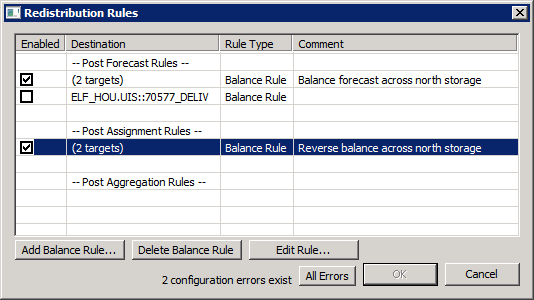
The Redistribution Rules dialog box shows a list of defined rules. Properties displayed include: Enabled, Destination, Rule Type, Comment, and Redistribution Type.
| Parameter | Description |
|---|---|
|
Enabled |
Click to enable or disable the balance redistribution rule. Note: Expression redistribution rules are always enabled. |
|
Destination |
Specifies the target facility for the redistribution rule. Note: If you are balancing to more than one target this will indicate the number of targets. Click Edit Rules to see the targets. |
|
Rule Type |
Specifies the type of redistribution rule: Expression or Balance. |
|
Comment |
A user-defined description or reason describing the distribution. |
|
Redistribution Type |
The rules are organized by redistribution type to indicate when during the energy forecasting process to have redistribution occur. Options include:
|
|
Add Balance Rule |
Click Add Balance Rule to add a Balancing Distribution rule to conditionally distribute a calculated forecast value for a group of meters based on whether the difference of two summed sets of meters is positive or negative. See Configuring Balancing Redistribution for more information. |
|
Delete Balance Rule |
Click Delete Balance Rule to delete a selected Balance rule. |
|
Edit Rule |
Click Edit Rule to edit a rule's properties. |
|
All Errors |
Click to see Meter/Group Settings Errors. |
Configuration Errors
If the meters or rules are misconfigured in any way, errors will be displayed at the bottom of the dialog box. A single error will display directly on the dialog box; if two or more configuration errors exist an All Errors button will display. Errors must be resolved before OK is enabled.


